
AI data centers did not make thermal design harder by a little. They took the old cooling playbook, fed it a rack full of accelerators, and asked why the fans look nervous.

For years, many server cooling discussions started with a simple question: which CPU heatsink should we use? Today, that question is still useful, but it is no longer enough. AI servers may need a CPU heatsink, a GPU heatsink, a fan sink, a vapor chamber, a liquid cold plate, a manifold, a CDU, and a facility loop all working together.
That sounds dramatic. The power numbers justify the drama.
NVIDIA lists the H100 SXM with a max thermal design power of up to 700W, and AI servers often use multiple GPUs per node. Goldman Sachs Research forecasts global data center power demand may rise by as much as 165% by the end of the decade compared with 2023. More compute means more heat. More heat means the old “add airflow and pray” strategy starts to look like thermal comedy.
This guide explains how to think about cooling AI data centers from the component level up. We will compare cpu heatsink and gpu heatsink designs, show where air cooling still works, explain when a heatsink becomes a cold plate, and use real project data from CPU cold plates, GPU cold plates, and air-to-liquid retrofit systems.
Why Cooling AI Data Centers Got Harder
Traditional enterprise data centers were often CPU-heavy. Cooling design could focus on room airflow, CRAC or CRAH systems, server fans, and CPU heatsinks.
AI data centers are different.

They pack high-power GPUs, CPUs, switches, storage, memory, NICs, and power electronics into dense racks. QATS’ article on Cooling AI Data Centers frames the challenge well: cooling now happens at both the micro level, around chips and server boards, and the macro level, across racks and the facility.
That multi-level view matters because no single cooling part solves the whole problem.
A GPU cold plate may remove heat from the accelerator. Fans may still cool DIMMs, controllers, NICs, and power supplies. A rear-door heat exchanger may reduce exhaust heat. A CDU or CDM may manage coolant flow, pressure, and heat transfer. The facility water loop still needs to reject that heat somewhere.
In other words, AI cooling is not a product. It is a chain. And the chain is only as strong as its leakiest fitting.
CPU Heatsink vs GPU Heatsink: Start With the Heat Path

Before choosing air or liquid cooling, map the heat path.
Heat starts at the silicon. It moves through the package, thermal interface material, base, fins or channels, and finally into air or liquid. Each layer adds thermal resistance.
The trick is to know which layer is limiting you.
What a CPU Heatsink Has to Do
A CPU heatsink removes heat from the processor package and transfers it into airflow. In a server, it must also fit strict mechanical limits:
- Socket keep-out zone
- Mounting pressure
- Board component height
- Airflow direction
- Fan pressure
- TIM thickness
- Base flatness
- Service access
A bigger heatsink is not always a better heatsink. If the base is not flat, the TIM is poorly selected, or the airflow bypasses the fin stack, you have built a shiny aluminum sculpture.
For higher-power CPUs, the TIM layer becomes especially important. In real thermal material programs, we have worked with thermal pads at 18 W/mK or higher, thermal gels at 16 W/mK or higher, and thermal grease around 7 W/mK. Those numbers matter because contact resistance can quietly eat the performance your heatsink was supposed to deliver.
What a GPU Heatsink Does Differently
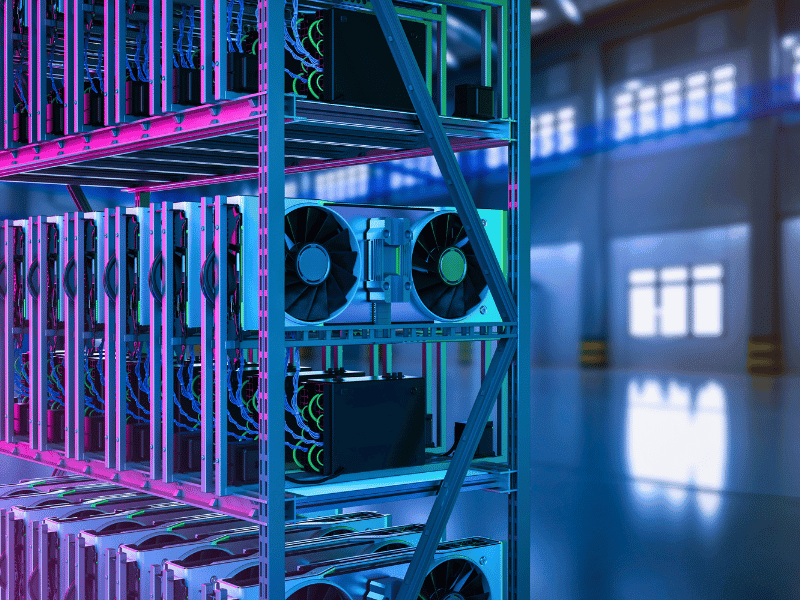
A GPU heatsink has a wider thermal job.
It may need to cool:
- GPU die
- HBM or memory packages
- VRM components
- Switch chips
- Local power components
- Board stiffener zones
- Connector-side airflow shadows
That is why a gpu heatsink often uses heat pipes, vapor chambers, copper bases, dense fin stacks, or custom ducting.
For workstation and edge AI systems, a well-designed air-cooled GPU heatsink can still be the right answer. For high-density AI training servers, the heat load often pushes the design toward GPU cold plates and direct-to-chip liquid cooling.
When a Heatsink Becomes a Cold Plate

ASHRAE describes a cold plate as a heat exchanger made from a metal plate with fins and channels that move heat from high-density processors into a pumped cooling liquid. The same ASHRAE article notes that cold plates have specific requirements for temperature, flow, pressure drop, material compatibility, and cleanliness.
That definition is useful because it shows the handoff point.
A heatsink sends heat into air. A cold plate sends heat into liquid.
You start considering a cold plate when:
- Airflow is not enough
- Noise is too high
- Rack density is too high
- Chip power is too high
- Air-side pressure drop is too high
- Component temperature margin is too small
- Service or reliability goals require tighter control
Liquid cooling is not a trophy. It is a response to a thermal and system-level constraint.
Main Cooling Options for AI Data Centers
Here is the quick map.
| Cooling option | Best fit | Typical heat range | Watch-outs |
|---|---|---|---|
| Passive heatsink | Edge AI, low-power embedded systems | Under 50W | Limited thermal headroom |
| Fan sink | Edge AI, embedded inference, small servers | Under 100W | Noise, dust, fan life |
| CPU heatsink | Standard server CPUs | 100-300W+ | Airflow and socket constraints |
| GPU heatsink | Workstation GPUs, edge AI, some inference systems | 150-350W | Weight, airflow, fin density |
| Heat pipe / vapor chamber heatsink | High-performance air cooling | 250-350W+ | Orientation, cost, mechanical support |
| CPU cold plate | High-power CPUs, dense servers | 300W+ | Flow rate, pressure drop, leak control |
| GPU cold plate | AI accelerators, training servers | 500-700W+ per GPU | Manifold design, flow balance, cleanliness |
| Air-to-liquid retrofit | Existing racks moving to partial liquid cooling | 1-3kW+ node zones | Space, serviceability, leak detection |
| Full liquid architecture | High-density AI racks | 6kW+ server loads | CDU/CDM, facility water, monitoring |
| Immersion cooling | Special high-density or facility-driven designs | System dependent | Fluid compatibility and maintenance model |
Notice what is not in the table: “one universal best cooling method.”
There is no universal best method. There is only the right method for the heat load, airflow budget, rack density, reliability target, and service model.
Air Cooling Still Matters
Air cooling is not dead. It just has to stop pretending it can do every job alone.
In liquid-cooled servers, fans may still cool DIMMs, power supplies, controllers, NICs, SSDs, and other board components. QATS makes the same point: fans remain essential for supporting components even when GPUs and CPUs use direct liquid cooling.
Air cooling is still a strong fit for:
- Edge AI systems
- Embedded AI modules
- Lower-power inference nodes
- Workstation GPUs
- Network cards
- Storage modules
- Power supplies
- Hybrid liquid-cooled racks
GPU Heatsink Design Window Around 300-350W
In one 300W GPU air-cooling module, the heatsink package measured 323.97 x 122.3 x 24.11 mm. It used AL1100 fins at 0.3 mm thickness and seven heat pipes, with two 8 mm pipes and five 6 mm pipes.

In another 350W GPU air-cooling module, the package measured about 325.9 x 120 x 25.7 mm. It used AL1100 fins at 0.3 mm thickness and a six-heat-pipe loop-bending layout, with two 8 mm pipes and four 6 mm pipes.
These designs show where a gpu heatsink can still make sense.
At this power level, the key design levers are:
- Fin thickness
- Fin pitch
- Heat pipe diameter
- Heat pipe routing
- Base flatness
- Airflow impedance
- Fan curve
- Noise limit
- Weight support
- Vibration reliability
But do not copy a workstation GPU heatsink into an AI training rack and call it a day. That is like using a laptop stand as a data center architecture. The words are nearby. The engineering is not.
CPU Cold Plates: The Next Step After High-Power CPU Heatsinks
When CPU power rises, a traditional cpu heatsink can run out of room. Liquid cooling may become more practical.
Here is a real dual-CPU cold plate example.
| Parameter | Project data |
|---|---|
| Material | C1100 copper |
| Process | Skived + brazed integrated structure |
| Platform | Intel Whitley |
| Size | 118 mm x 78 mm x 10 mm |
| CPU thermal load | 350W x2 |
| Connector | Staubli DAG06 |
| Tube | EPDM braided tube |
This is where cooling design gets interesting. More flow can lower temperature, but it also raises pressure drop.
| Flow | Pressure drop | Inlet temp | CPU1 Tc max | CPU2 Tc max |
|---|---|---|---|---|
| 0.50 LPM | 4.9 kPa | 40.5 deg C | 57.3 deg C | 64.5 deg C |
| 0.70 LPM | 11.0 kPa | 40.4 deg C | 54.6 deg C | 59.0 deg C |
| 1.00 LPM | 19.5 kPa | 40.2 deg C | 53.0 deg C | 55.8 deg C |
| 1.20 LPM | 29.0 kPa | 40.3 deg C | 52.5 deg C | 54.6 deg C |
At 0.50 LPM, CPU2 Tc max reached 64.5 deg C. At 1.20 LPM, CPU2 Tc max dropped to 54.6 deg C. That is a useful improvement.
But pressure drop also increased from 4.9 kPa to 29.0 kPa.
That is the lesson: flow is not free cooling. More flow can reduce temperature, but the pump, manifold, tubing, acoustic design, and reliability budget all get a vote.
The pump is not an infinite mana bar. Thermal engineers learn this the calm way or the expensive way.
GPU Cold Plates: Why 700W AI GPUs Changed the Game
The gpu heatsink question changes once you enter 700W-class AI accelerators.
NVIDIA’s H100 SXM specification lists max TDP up to 700W. When a server uses eight of those devices, the GPU heat load alone can reach rack-design-altering levels. Air cooling may still support secondary components, but the main accelerator path often shifts toward GPU cold plates.
H800 GPU Cold Plate Example
One H800 GPU cold plate project used:
| Item | Data |
|---|---|
| Material | Aluminum alloy |
| Process | Skived + brazed integrated structure |
| Flow topology | GPU cold plates in 2-series, 4-parallel arrangement |
| Thermal load | GPU 700W x8 + switch 135W x4 |
| Connector | Staubli SPT10 |
| Tube | EPDM braided tube |
| Project stage | DVT |
The 2-series, 4-parallel topology is not a decorative detail. It affects flow balancing, pressure drop, temperature rise, and serviceability.
DVT status also matters. Design Validation Test means the design is still proving itself under defined conditions. If you are sourcing a similar GPU cold plate, ask for the test boundary, coolant condition, flow curve, pressure drop curve, leak test method, and cleanliness control.
H100 GPU Cold Plate Example
Another H100 GPU cold plate project used:
| Item | Data |
|---|---|
| Material | Aluminum alloy |
| Process | Skived + brazed integrated structure |
| Thermal load | 700W x8 + 134W x2 + 156W x2 = 6,180W |
| Connector | DAG06 |
| Tube | EPDM braided tube |
| Project stage | PVT |
PVT, or Production Validation Test, is closer to mass production than DVT. It tells buyers the project is moving beyond “we built a clever prototype” toward “we can repeat this without summoning the quality team at midnight.”
The key point is simple: 6,180W is not “a warmer server.” It is a different cooling architecture.
Do Not Forget Switches, Storage, DIMMs, and HDDs

AI clusters are not only GPU heaters with network cables attached.
Switches and storage also get hot. As AI clusters grow, networking and data movement become part of the thermal story.
One storage switch liquid cold plate project used:
| Item | Data |
|---|---|
| Material | C1100 copper |
| Process | Skived + brazed integrated structure |
| Structure | Manifold + Mac cold plate + Cage cold plate |
| Thermal load | Mac cold plate 800W, Cage cold plate 400W x4 |
| Connector | Staubli DAG06 + DAG03 |
| Tube | PTFE corrugated tube |
| Project stage | DVT |
That is a good reminder. In AI data centers, the hottest component may get the headline, but the supporting cast still needs cooling.
Ignore the network and storage heat, and your cluster may not fail dramatically. It may just throttle, complain, and ruin your day in a more bureaucratic way.
Air-to-Liquid Retrofit: When You Cannot Rebuild the Whole Data Center
Many data centers cannot jump from air cooling to full liquid cooling overnight.
Racks have space limits. Operations teams need service procedures. Facility loops may need upgrades. Leak detection must be planned. Quick connectors need room. Condensation risk must be managed. Coolant chemistry has to be controlled.
That is why air-to-liquid retrofit is a practical middle path.
In one retrofit project, the cooling system used:
| Item | Data |
|---|---|
| Material | C1100 copper |
| Process | Skived + brazed integrated structure + buried-pipe cold plate |
| Cooling scope | CPU cold plate, DIMM, HDD cold plate, and several board cards |
| Total thermal load | About 3,000W |
| Connector | Parker NSG03 |
| Tubing | EPDM braided tube + copper tube |
| Project stage | DVT |
This type of retrofit is not only a thermal problem.
It is also a packaging, maintenance, leak detection, flow distribution, and operations problem. If the design team solves the temperature but makes the rack impossible to service, the operations team will remember your name. Not in a warm way.
Manufacturing Reality: A Good Heatsink Is Not a Pretty Render
A data center cooling part has to survive more than a product render.
It has to survive machining, brazing, welding, pressure, flow, vibration, cleaning, shipping, installation, and years of service. This is where supplier selection becomes important.
Materials and Processes to Ask About
For a cpu heatsink, gpu heatsink, or cold plate program, ask about:
- Copper C1100
- Aluminum alloy
- AL1100 fins
- Skived fins
- Extrusion
- Die casting
- Friction stir welding
- Brazing
- Laser welding
- Vacuum welding
- Reflow soldering
- Buried-pipe cold plates
- Heat pipes
- Vapor chambers
- TEC modules
These are not buzzwords. They define cost, thermal resistance, pressure capability, weight, manufacturability, and reliability.
Validation Tests That Matter
Here is the test checklist buyers should request.
| Test or control | Why it matters for AI data centers |
|---|---|
| Air thermal resistance test | Verifies heatsink and fan sink performance |
| Flow resistance + thermal resistance test | Balances cooling gain against pump penalty |
| Seal test / airtightness | Reduces leak risk in liquid-cooled racks |
| Helium leak test | Finds fine leakage before rack integration |
| Ultrasonic flow channel thickness test | Checks internal channel consistency |
| Channel cleanliness test | Reduces blockage and contamination risk |
| Fan performance test | Supports DIMM, PSU, NIC, and hybrid cooling |
| Random vibration / shock | Protects shipping and long-term reliability |
| High-temperature aging | Catches material and joint fatigue |
| Thermal shock | Tests rapid temperature change reliability |
| CMM measurement | Verifies dimensional accuracy |
| Flatness control | Protects contact performance |
In our production experience, serious validation can require far more than a thermal camera and a hopeful expression. Relevant capabilities include flow resistance and thermal resistance testing, sealing tests, mechanical testing, pressure testing, product failure analysis, welding performance analysis, cleanliness testing, rapid temperature change, cold-hot shock, vibration, high-temperature aging, salt spray, ultrasonic channel checks, fan performance tests, high/low-pressure airtightness, and both dual-chamber and single-unit helium leak testing.
One mature lab setup includes 58 sets of professional test equipment, a 2,000 square meter test area, and a 10-person test team.
That is the difference between “we measured it once” and “we can support a production program.”
Traceability and Production Control
AI data center cooling parts are often high mix and high reliability. Traceability matters.
Useful production capabilities include:
- 5+2 assembly and test lines
- 3,000 square meter clean room
- Acoustic testing
- Flatness testing
- Digital control for key processes
- Barcode traceability
- Automated inspection
- MES monitoring across production
- Material and process traceability
- ERP and PLM integration
If a supplier can only show a cold plate rendering but cannot explain leak testing, flow resistance, channel cleanliness, and traceability, that is not a thermal solution. That is PDF cosplay.
How to Choose Between CPU Heatsink, GPU Heatsink, and Liquid Cooling
Use this decision table as a starting point.
| Scenario | Better starting point | Why |
|---|---|---|
| Edge AI under 100W | Passive heatsink or fan sink | Simple, serviceable, low liquid risk |
| 150-300W CPU/GPU | High-performance air heatsink, heat pipe, or vapor chamber | Still feasible if airflow and noise allow |
| 300-350W GPU | Advanced gpu heatsink or hybrid design | Heat pipe count, fin density, and airflow become critical |
| Dual 350W CPU | CPU cold plate | Flow, Tc max, and pressure drop need controlled design |
| 700W AI GPU | GPU cold plate | Direct-to-chip liquid cooling becomes practical |
| 3kW retrofit node | Air-to-liquid retrofit | CPU, DIMM, HDD, and board cards may need partial liquid cooling |
| 6kW+ AI server thermal load | Full liquid architecture | Manifold, quick connectors, CDU/CDM, leak detection, and serviceability matter |
The table is not a replacement for simulation and testing. It is a way to start the conversation without opening 47 spreadsheets at once.
Supplier Checklist for AI Data Center Cooling Projects
Before buying a cpu heatsink, gpu heatsink, or cold plate, ask better questions.
Ask These Before Buying a CPU Heatsink
- What is the CPU TDP and boost power?
- What is the die or IHS size?
- What is the socket keep-out zone?
- What TIM material and thickness are required?
- What thermal resistance is needed?
- What is the airflow direction?
- What is the system impedance?
- What mounting pressure is allowed?
- What flatness is required?
- What noise target must be met?
- At the target rack density, is liquid cooling already needed?
Ask These Before Buying a GPU Heatsink
- What is the GPU TDP?
- What does the hotspot map look like?
- Does the design also cool HBM, VRM, switch, or memory?
- What is the airflow budget?
- What is the fin material and thickness?
- Does it use heat pipes or vapor chambers?
- What is the weight limit?
- How is the heatsink mechanically supported?
- Has it passed vibration and shipping validation?
- For 700W-class GPUs, should a cold plate be the baseline instead?
Ask These Before Buying CPU or GPU Cold Plates
- Is the material copper or aluminum?
- Is the process skived and brazed, friction stir welded, buried-pipe, or machined channel?
- Is the flow topology series, parallel, or mixed?
- What is the flow rate curve?
- What is the pressure drop curve?
- What thermal resistance data is available?
- What coolant was used in testing?
- What inlet temperature was used?
- What leak test method was used?
- What is the leak acceptance criterion?
- What cleanliness standard is used?
- What connector type is selected?
- Can the connector be serviced in the rack?
- Is the project in DVT, PVT, or mass production?
- How is each part traced?
FAQ
What is the difference between a CPU heatsink and a GPU heatsink?
A CPU heatsink usually focuses on socket constraints, contact pressure, TIM, airflow, and CPU TDP. A GPU heatsink often has to cool a wider thermal map, including GPU die, HBM, VRM, switch chips, and nearby board components.
Can air cooling still work in AI data centers?
Yes. Air cooling can still work for edge AI, embedded AI, workstation GPUs, DIMMs, PSUs, NICs, and hybrid racks. But high-density 700W-class AI GPUs often require direct-to-chip liquid cooling.
When should a gpu heatsink become a GPU cold plate?
When airflow, noise, rack density, and thermal resistance cannot meet the target, a cold plate becomes the better baseline. For 700W-class AI GPUs, direct liquid cooling is often more practical than forcing air cooling past its comfort zone.
What data should I request before buying a CPU cold plate?
Ask for flow rate, pressure drop, thermal resistance, Tc max, inlet temperature, material, process, connector type, leak test method, and cleanliness control.
Why does pressure drop matter in liquid cooling?
Higher flow can lower chip temperature, but it also raises pressure drop and pump workload. A good cold plate balances thermal gain against hydraulic cost.
Is immersion cooling better than cold plates?
Not universally. Immersion cooling can help in some high-density or facility-driven designs, but it changes maintenance, fluid compatibility, hardware qualification, and operations. Cold plates are often easier to integrate into server architectures that still need familiar service models.
Final Takeaway
Cooling AI data centers is not a battle between air and liquid. It is a layered design problem.
Use a cpu heatsink when airflow, socket limits, and TDP still make sense. Use a gpu heatsink when the heat load fits the air-cooling window. Use heat pipes, vapor chambers, and skived fins when air cooling needs help. Move to CPU cold plates or GPU cold plates when chip power, noise, rack density, or airflow resistance breaks the air-cooled model.
And when you move to liquid cooling, do not stop at the cold plate.
Ask about flow rate, pressure drop, leak testing, channel cleanliness, connector serviceability, DVT/PVT status, and production traceability. A cold plate that looks good in a render but cannot pass validation is just an expensive aquarium accessory.
If you are planning an AI server, retrofit rack, GPU cluster, or data center liquid cooling project, start with the real inputs: CPU/GPU TDP, board layout, airflow budget, rack power target, coolant parameters, pressure drop budget, and reliability requirements.
The path from cpu heatsink to gpu heatsink to cold plate is not a guess. It is an engineering map. Bring data, and the heat has fewer places to hide.
Ready to optimize your AI infrastructure? Return to our Home page
to see our latest innovations, or Contact our engineering team today to discuss your cooling project.