

Data center cooling transfers heat from IT equipment to a place where it can be rejected or reused. Air cooling moves heat through server heat sinks and airflow. Direct-to-chip liquid cooling carries heat away through cold plates. Immersion cooling places compatible electronics in dielectric fluid, while rear-door heat exchangers transfer heat from server exhaust air into a liquid loop.
Data center cooling systems must match the IT equipment, the available infrastructure and the operating conditions. A cold plate, fan or chiller can perform its own job correctly while another part of the thermal path limits the installation.
This guide follows that path from the chip to the facility, compares the main approaches, and identifies the information needed to specify server cooling components.
What Does Data Center Cooling Do?
Processors, memory, networking equipment, storage and power-conversion components release heat during operation. Cooling keeps those components within their specified thermal limits so the equipment can maintain its intended performance.
There are two linked tasks: collecting heat close to its source and transporting that heat out of the IT environment. The design must also account for maintenance, changing workloads and the response to equipment faults.
Three questions establish the scope:
- What must stay below its temperature limit? A processor junction, package surface, memory device and server air inlet are different measurement locations.
- How will heat travel away from it? Identify the solid interfaces, air passages, liquid circuits and heat exchangers in that route.
- Where does the heat go next? An indoor cooling device needs a downstream destination for the heat it collects.
This is why specifying only a room temperature or a nominal cooling capacity gives an incomplete picture. The engineering brief needs both the local component conditions and the facility conditions that support them.
Heat Path: Chip, Server, Rack and Facility
Follow the energy through four levels: the heat source, the server assembly, the rack or room system, and the facility heat-rejection system.
In an air-cooled server, heat travels through the package and thermal interface into a heat sink. Air flowing through the fins carries it into the exhaust stream. Room or row cooling equipment collects that heat, and the facility transfers it outdoors through its chosen cooling system.
In a representative liquid-to-liquid direct-to-chip installation, the route is different: the package transfers heat into a cold plate, the server coolant carries it through the rack circuit, and a coolant distribution unit transfers it into the facility loop. Downstream equipment then rejects the heat outdoors or supplies it to a suitable heat-reuse system.
Schneider Electric’s liquid-cooling architecture white paper treats server connections, manifolds, CDUs and outdoor heat rejection as parts of the same design problem.
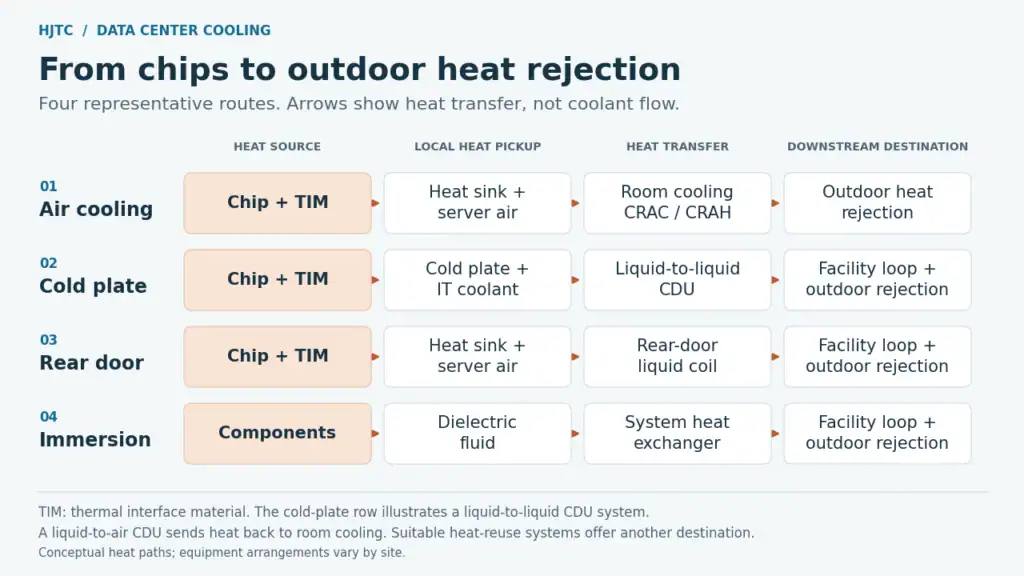
The arrows in this diagram show heat transfer. They do not show a continuous pipe carrying the same coolant through every component.
What a CDU does—and where the heat goes
In a liquid-to-liquid CDU, a heat exchanger separates the IT coolant circuit from the facility circuit while allowing heat to pass between them. A rack manifold distributes coolant to the server branches. These components have different roles, even when supplied as an integrated system.
A liquid-to-air CDU instead releases collected heat into the data hall air. That can support a deployment without a facility-water connection at the CDU, but the room cooling system must have capacity for the added heat. Vertiv explains this distinction in its data center liquid-cooling deployment guide.
At the facility end, dry coolers, cooling towers, refrigeration equipment and heat exchangers perform different jobs. Their arrangement depends on the required temperatures and local conditions. A chiller provides refrigeration when needed; it is not an unavoidable element of every possible cooling architecture.
Air Cooling and Containment
Air cooling starts with a usable air path through the server. Heat-sink geometry, fan performance, cables, nearby components and the chassis determine whether enough air reaches the surfaces that need cooling.
At room level, hot-aisle/cold-aisle arrangements separate server inlet air from exhaust air. Physical containment strengthens that separation. Blanking unused rack spaces and managing openings also help control bypass and recirculation. The LBNL-hosted evidence-based data center management guide discusses these air-management measures.
For a component specification, the useful question is: what air conditions will the heat sink actually receive inside the installed system? A fan’s maximum free-air flow is not a guarantee of the flow through a restrictive server assembly.
CRAC, CRAH and the server heat sink
A computer room air conditioner, or CRAC, commonly uses a direct-expansion refrigeration circuit. A computer room air handler, or CRAH, commonly cools air through a chilled-water coil. Neither replaces the heat sink and airflow inside an air-cooled server. Vertiv’s precision-cooling overview describes these room-to-facility arrangements.
Air cooling deserves consideration when the server can meet its component limits with the available inlet conditions and airflow. It also needs a check against acoustic requirements, fan power, service access and the planned workload.
For the component stage, HJTC’s heat sink range provides a starting point for discussing the mechanical envelope and manufacturing route. Final selection should use the installed conditions, rather than an isolated product shape or fin count.
Direct-to-Chip, Immersion and Rear-Door Heat Exchangers
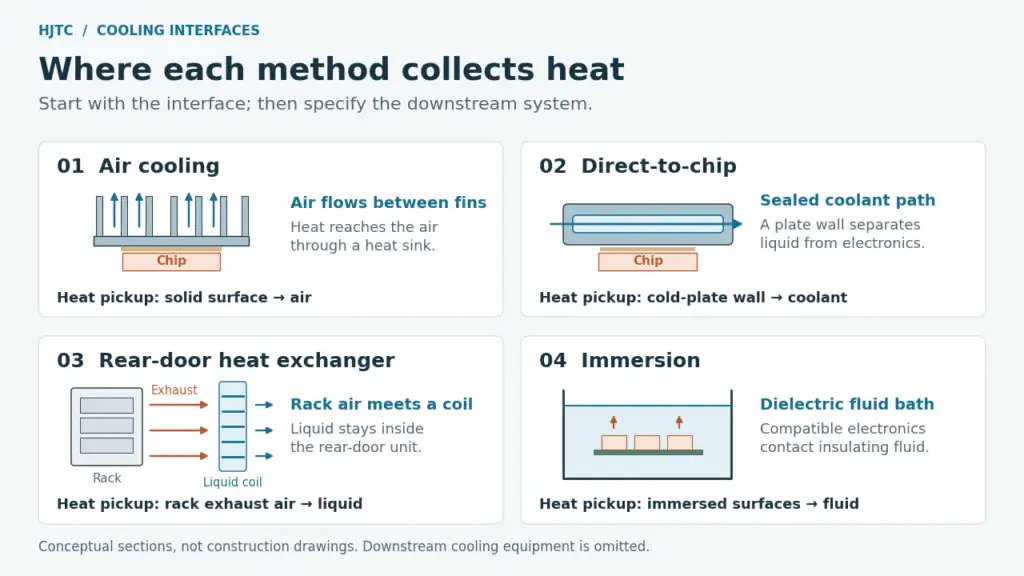
These approaches collect heat at different locations. Understanding that interface makes the rest of the system easier to specify.
Direct-to-chip liquid cooling
A cold plate attaches to a heat-generating component. Heat crosses the package and contact interface, conducts through the plate, and enters the coolant inside it. In a conventional sealed cold-plate design, the coolant remains inside the cooling hardware rather than bathing the circuit board.
Cold plates can be connected into server-level loops. CoolIT’s cold-plate and server-loop overview illustrates this distinction between the individual heat exchanger and the integrated assembly.
This approach is relevant when heat must be collected close to concentrated sources. It still requires compatible mounting, fluid connections and a downstream heat-rejection path. If a project needs custom geometry or interfaces, start with the heat-source layout and the available loop conditions when evaluating liquid cold plates.
Immersion cooling
Immersion places compatible electronics in an electrically insulating, or dielectric, fluid. In a single-phase system the fluid stays liquid; a two-phase system uses boiling and condensation as part of the heat-transfer process.
The fluid, electronics and servicing method must be considered together. Immersion changes how equipment is accessed and handled, so the decision reaches beyond the choice of heat exchanger. Vertiv’s liquid and immersion cooling overview describes both forms.
Rear-door heat exchangers
A rear-door heat exchanger, or RDHx, collects heat from the air leaving a rack and transfers it into liquid. The server still uses an internal air path to move heat away from its components.
Rear-door equipment can use passive or fan-assisted arrangements. Vertiv’s RDHx product documentation also shows how a rear-door unit can complement direct-to-chip cooling by handling the remaining air-cooled load.
Hybrid cooling
An installation may combine these approaches. Some components can use cold plates while others depend on airflow. The split should come from the actual server design, not a fixed assumption that liquid removes a certain percentage of every rack’s heat.
Vertiv’s manifold and cooling-system explanation describes the continued role of air cooling for components outside the direct-liquid path. Record that remaining load when sizing room cooling and reviewing failure conditions.
How to Choose a Data Center Cooling Architecture
Begin with the IT equipment requirements and the infrastructure available at the site. The following table is a screening tool for those discussions, rather than a capacity rating or a substitute for system validation.
| Approach | Where heat is collected | Consider it when | Confirm before selection |
|---|---|---|---|
| Air cooling | Heat sinks transfer heat to server airflow | The equipment can meet its thermal limits with the available air path | Inlet conditions, installed airflow, fan operating point and containment |
| Direct-to-chip liquid cooling | Cold plates at selected components | Localized heat loads justify bringing coolant close to the source | Server compatibility, plate interfaces, flow, pressure and the heat-rejection route |
| Rear-door heat exchanger | Rack exhaust air transfers heat into a liquid coil | Rack-level heat collection fits the existing server architecture | Rack fit, airflow resistance, liquid services and maintenance conditions |
| Immersion cooling | Dielectric fluid contacts compatible electronics | Hardware and operations can support fluid immersion | Material compatibility, handling, servicing and tank-to-facility integration |
| Hybrid cooling | Heat is divided between liquid and air paths | Different components need different cooling arrangements | The heat assigned to each path, remaining air demand and control response |
There is no universal processor wattage or rack-power threshold that determines the answer. The OCP Cold Plate Requirements document explicitly treats the transition as dependent on multiple technical and economic conditions.
Use this sequence to make a selection review concrete:
- Define the equipment. Record the platform, supported cooling configuration, heat-source layout and operating workload.
- Describe the available environment. Establish server inlet conditions or liquid supply conditions at the actual equipment connection.
- Identify the limiting part of the route. Determine whether the concern is a local interface, server airflow, a liquid branch, room capacity or downstream rejection.
- Review operation and service. Include replacement access, shutdown requirements, fault response and who owns each interface.
- Compare the complete project. Include cooling hardware, integration work, commissioning, maintenance and the energy and water measured within an agreed boundary.
For example, two proposed deployments could have the same nominal IT load but different constraints. One may have air-compatible servers and a distribution problem; another may require direct-liquid connections specified by the server OEM. The same headline power number would not make their engineering tasks identical.
Treat a successful architecture review as a set of agreed requirements. It should give the component supplier clear conditions to design against and the facilities team a clear downstream load to accommodate.
Temperature, Flow and Reliability Inputs
Before requesting a server heat sink or cold plate, assemble a brief that allows suppliers to evaluate the same problem. A drawing without operating conditions leaves too much room for incompatible assumptions.
| Input | What to include |
|---|---|
| Heat sources | Component locations, contact dimensions, power map and relevant workload or duty cycle |
| Temperature limits | The specified junction, case or other component limit, plus the permitted server-air or liquid-inlet conditions |
| Air-side conditions | Available airflow, allowable resistance, fan information, chassis constraints and expected bypass paths |
| Liquid-side conditions | Coolant specification, inlet-temperature range, target flow, available pressure and allowable pressure drop |
| Mechanical interfaces | Envelope, mounting points, contact surface, TIM arrangement, installation load and connection access |
| Validation conditions | Test setup, measurement locations, acceptance limits and the operating points to be evaluated |
| Production and service | Quantity, inspection records required, traceability needs and replacement procedure |
Keep temperatures tied to their measurement locations
Room temperature, server inlet temperature, coolant inlet temperature and semiconductor junction temperature describe different points. A statement such as “operates at 35°C” is incomplete until the location and conditions are identified.
Set component limits from the relevant equipment documentation. Then specify the air or liquid conditions the cooling component must use to meet those limits. Include the expected upper end of that operating range in the verification plan.
Specify pressure and flow together
Required flow must be considered alongside the resistance of the complete liquid route. A cold plate, hose, coupling and manifold each contribute to the hydraulic conditions. An adequate thermal capacity rating alone does not establish that the required flow will reach the server.
Define what the tests demonstrate
Leak testing, pressure validation and thermal testing answer different questions. Ask for the method, conditions and acceptance criteria relevant to the assembly being purchased. A pressure test does not establish component temperature, and a thermal simulation does not replace a measured validation result.
For liquid-contact materials, the coolant specification must be considered with the full wetted-material set. The OCP reference organizes these interfaces and parameters, but its 2019 Revision 1.0 should not be treated as a substitute for current project specifications or applicable requirements.
Efficiency Measurement Boundaries
A cooler component and a more efficient facility are related outcomes, but they are measured differently.
At component level, useful results include temperature rise and thermal resistance under stated boundary conditions. At system level, fan and pump energy also matter. Facility-level metrics cover a wider set of equipment and operating conditions.
The DOE’s 2024 data center design guide explains two widely used metrics:
- Power usage effectiveness (PUE): total data center energy divided by IT equipment energy over the same reporting period.
- Site water usage effectiveness (WUE): site water use divided by IT equipment energy, commonly expressed in liters per kilowatt-hour.
PUE is not a measurement of useful computing work, and a component test cannot by itself establish a facility’s PUE or WUE.
For a proposed improvement, agree on the comparison before collecting data: the workload, test period, ambient or supply conditions, metering boundary and equipment included. State whether the result is measured, simulated or estimated.
Economizers can reduce refrigeration demand when environmental conditions and required supply temperatures permit. That opportunity depends on the facility arrangement; installing a cold plate does not automatically produce a particular energy-saving percentage.
For existing air-cooled installations, LBNL’s Data Center Air Management Tool offers a way to investigate air-management opportunities. Any resulting estimate should remain tied to its inputs and assumptions.
HJTC Component Support and Frequently Asked Questions
HJTC focuses on thermal components for high-power electronics, including heat sinks and liquid cold plates. Its product reference material covers copper-pipe, skived, bonded-fin and extruded heat-sink forms, providing several manufacturing routes to discuss against a project’s space and thermal requirements.
Our server-cooling reference material also illustrates the connection between a data hall, rack liquid-cooling equipment and a brazed copper cold-plate assembly. This is useful for defining the scope of a component project: the plate must match the server, while its fluid connections and operating conditions must match the system around it.
The practical starting point is a requirements review. Share the heat-source layout, temperature limits, available air or liquid conditions, mechanical envelope and intended quantity. HJTC can then discuss the relevant component options within its data center thermal-component scope.
How are data centers cooled?
Heat is collected from IT equipment and transported to a downstream cooling system. Depending on the installation, that collection uses server airflow, cold plates, rack heat exchangers or immersion fluid. The heat must ultimately be rejected or delivered to a usable heat-recovery destination.
Is liquid cooling always better than air cooling?
The appropriate choice depends on the equipment limits, available infrastructure and operating requirements. Compare complete systems against the same conditions. A technology label alone does not establish performance, serviceability or total cost.
Do liquid-cooled servers still need fans?
Many designs retain airflow for components outside the cold-plate loop. Check the actual server configuration and the heat assigned to each cooling path before reducing air-side capacity.
Does direct-to-chip cooling put water on the electronics?
In a conventional cold-plate system, coolant flows inside sealed channels or tubing. Heat reaches it through the component interface and plate wall. Immersion cooling uses a different arrangement, with compatible electronics in dielectric fluid.
What information should I send for a custom cooling component?
Send the heat-source dimensions and power map, temperature limits, available airflow or coolant conditions, mounting constraints, envelope and quantity. Include drawings and validation requirements when available.
Planning a server heat sink or liquid cold plate? Request a Thermal Solution and share your project requirements with HJTC.