

The PS5 and PS5 Pro both use liquid metal at the main processor and heat pipes to carry heat to the fins. The 2024 Pro adds fine grooves at the chip contact, uses more copper pipes to feed two fin sections, and changes how air moves through the case. Those features explain how Sony cools a more capable processor. Whether a particular console runs cooler or sounds quieter takes a measurement under load.
Which PS5 are you comparing with the Pro?
In Sony’s PS5 Pro teardown, the engineers use the 2020 launch PS5 to explain the original design. The standard console beside the Pro in their fan comparison is the smaller 2023 PS5, commonly called the Slim. A larger fan than the Slim’s does not establish how it compares with the launch fan.
| Console shown | Cooling detail to look for | What it tells you |
|---|---|---|
| Launch PS5 (2020; CFI-10xx) | Copper heat pipes, large fin stacks and a 120 mm fan drawing air from both sides. | Heat pipes and a substantial air cooler were already features of the launch model. |
| PS5 Slim (2023; CFI-20xx) | The compact standard PS5 with the smaller of the two fans in Sony’s side-by-side photo. | This is the reference for Sony’s fan-size comparison. |
| PS5 Pro (2024; CFI-70xx) | A grooved contact face, copper pipes beside the processor and two fin sections. | The redesign changes both the path into the heatsink and the airflow through it. |
You can see the launch assembly in iFixit’s original PS5 teardown. For a later revision, look up the CFI number on the console before matching it to a photo. For example, technician Modyfikator89’s photograph of a CFI-2116 Slim heatsink also shows grooves. A grooved contact face alone does not identify a Pro.
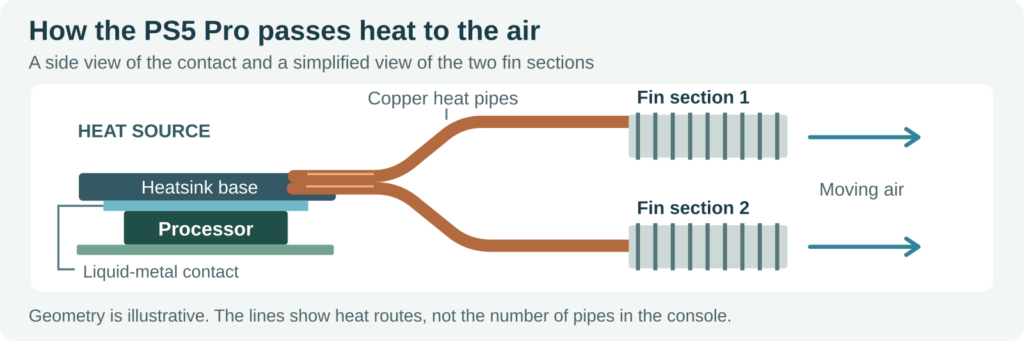
The heat path in the 2024 Pro. The two fin groups are functional blocks; pipe count, routing and part dimensions are not drawn to scale.
What the heat pipes, grooves and fan each change
Heat pipes carry heat to the fins
The metal touching the processor has little room to shed heat directly into the air. A heat pipe carries that heat to fins elsewhere in the case: fluid evaporates near the hot end, condenses near the fins and returns through a wick inside the pipe. The fins expose a much larger surface to the air.
Splitting the fins into two banks gives the designer a way to use space on different parts of the assembly. It does not tell you whether each bank removes half the heat. A bank behind an obstruction can receive heat through its pipes yet pass little of it to the air. That is why a photo of the pipes tells only part of the story.
Liquid metal bridges the contact at the chip
The liquid metal you see in a teardown sits between the processor die and the heatsink contact face. It fills small gaps at that joint. It is separate from the fluid sealed inside the heat pipes. Sony says the fine grooves at the Pro’s interface help its cooling remain stable; it does not give a temperature reduction for the grooves alone.
The vents influence what you hear
The Pro fan has reshaped blades with smaller vanes between them. Three slits in the Pro’s exterior provide extra air passages. Inside, louvers limit how much fan noise travels toward the front. Think of a console on a shelf: the listener faces the front, while air leaves through vents elsewhere. A microphone at the rear vent and a listener on the couch are sampling different things.
Does the PS5 Pro run cooler?
Sony’s teardown does not establish a temperature advantage for either console. To compare processor temperatures, you would need readings from the same point on both chips under comparable loads. Warm air at the outlet confirms heat is leaving; it cannot tell you the temperature inside the processor. Airflow rate and the temperature of the incoming air both affect the outlet reading.
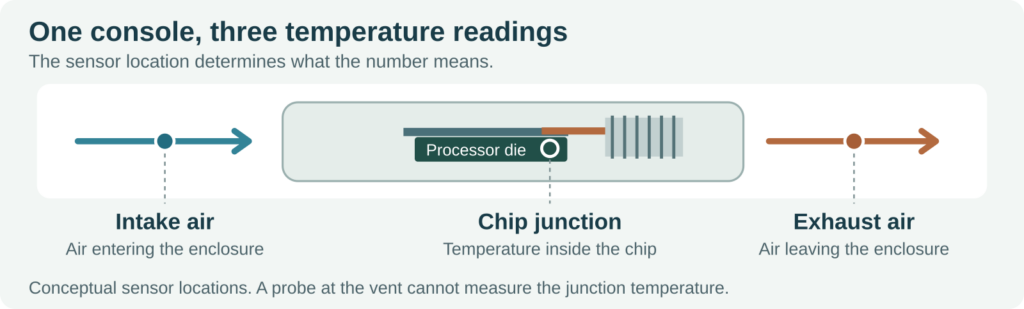
To compare temperatures, match the sensor location as well as the game scene, graphics mode, room conditions and time under load.
Is the PS5 Pro quieter in games?
In Hardware Busters’ acoustic test, the Pro sample was quieter at idle but louder than the comparison PS5 in every game the reviewer tested. The reported gaming noise stayed below 30 dBA in that setup. The chamber had a 6 dBA noise floor and a temperature of 25 ± 2°C. That result is useful if you are choosing for noise: an idle reading can give you the opposite impression from a gaming test.
Why power draw cannot rank two heatsinks
Power is another number often mistaken for cooling performance. Here are two UHD active-gaming entries from Sony’s UK energy-efficiency data. Both are three-game averages for the entire console.
| Console tested | UHD average | Games in the average |
|---|---|---|
| PS5 Digital Edition, CFI-2016 | 217.6 W | God of War Ragnarök; Hogwarts Legacy; Marvel’s Spider-Man 2 |
| PS5 Pro, CFI-7021 | 216.1 W | Marvel’s Spider-Man 2; Helldivers 2; Call of Duty: Black Ops 6 |
Only Spider-Man 2 appears in both lists. Subtracting the two averages gives 1.5 W, but it does not isolate the heatsink, or even compare the same three workloads. If you are deciding whether to upgrade, look for a test of the game and mode you actually use, with sound measured at the same distance.
What to check before buying a heatsink
If your existing PS5 gets loud in a demanding game, first look at where it sits. PlayStation’s ventilation advice calls for at least 10 cm of space around each side and clear vents. A closed cabinet can feed warm exhaust back into the intake. Replacing a main heatsink would not fix that airflow problem. For a repair part, have the supplier confirm the exact console revision and assembly; a similar-looking stack of fins is not proof of fit.
If you are adding storage, the part you want cools the M.2 SSD in the expansion slot. It does not touch the main processor on either console. Check Sony’s size limits for the finished SSD and cooler. Our GameStop PS5 SSD heatsink fit guide shows how to check a retail drive with its heatsink already attached.
A design takeaway for compact electronics
HJTC builds aluminum and copper cooling assemblies, including heat-pipe heatsinks for CPU and GPU applications. For a custom heat-pipe design, show the chip contact area, usable fin space and fan inlet on the same drawing. Then specify the heat load, allowable temperature and noise target. Those details give a heatsink manufacturer something more useful to design against than a request to match a console’s pipe count.