
A PS5 can fit inside a TV cabinet and still have too little room to cool itself. PlayStation’s placement guidance calls for at least 10 cm (about 4 in) of free space around each side, with the side and rear vents unobstructed. Check the gap behind the installed console as well as the route the warm air takes out of the furniture. A door that closes neatly tells you very little about either.
Measure from the console to the nearest obstruction
Put the console in its intended orientation on a stable shelf, using the base or feet specified for your model. Take your measurements from the case to the nearest panel, partition or wall. Use the shelf’s clear inside dimensions, not the outside dimensions in a furniture listing. Allow for the power and HDMI plugs without forcing them against the back panel or bunching cables across a vent.
A 300 mm shelf with a PS5 Pro
Sony lists the CFI-7019 PS5 Pro at approximately 216 mm deep, excluding projecting parts. Suppose a shelf measures 300 mm from its front edge to a solid back panel and the front of the horizontal console is flush with that edge. The nominal rear gap is 300 − 216 = 84 mm, or about 3.3 in. That is already 16 mm short of the guide’s 100 mm wall clearance, before allowing for projections or plugs.
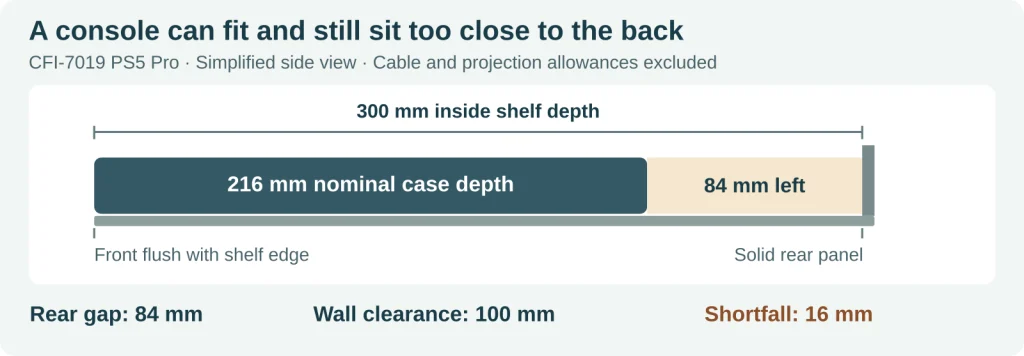
Worked example for one CFI-7019 on a shelf with a solid rear panel. Only depth is shown; check side clearance and the actual installed hardware separately.
Move the same console 20 mm farther inside that shelf and the nominal rear gap drops to 64 mm. If the cabinet has no back panel, the shelf edge is not the obstruction: measure to the wall behind it. Keep the console and its supports fully on the shelf. This example is a way to check your furniture, not a minimum cabinet size for every PS5.
Does opening the cabinet door give the PS5 enough air?
An open door can give room air a way in. The other half of the check is where the exhaust goes. If warm air hits a solid back panel and circulates around the console, the fan can draw some of it in again. More room at the front does not change the measured rear gap.
| Shelf arrangement | What to inspect | Practical decision |
|---|---|---|
| Open shelf, no back panel | Distance to the actual wall; papers, cables or another device beside the vents. | Use the shelf only if the gaps are clear and exhaust can escape to the room. |
| Open front, solid back | The smallest gap between the installed case and the rear panel. | If the rear gap is too small, choose a deeper or open-backed shelf. |
| Glass door, small cable hole | Where cool air enters and warm air exits while the door is closed. | A cable hole alone does not establish adequate ventilation. Use an open location if the cabinet confines the air. |
The same distinction applies to a cabinet fan. A fan that only stirs the pocket of air behind the console is not a substitute for an outlet to the room. Sony’s Pro safety guide still calls for clear space at the wall and advises against cramped locations.
What to do if the PS5 gets loud or shows a heat warning
A fan can speed up during a demanding game without a fault. If there has been no heat warning, listen to the same game and scene with the console in a compliant open location. A change in sound can help you decide where to keep it, but it does not measure the chip temperature or identify a failed heatsink. The PS5 and PS5 Pro cooling comparison explains why fan sound and processor temperature answer different questions.
If a heat warning does appear, turn the console off and let it cool. Move it to a well-ventilated location before using it again. If warnings recur there, contact PlayStation support instead of repeating the test.
A distinction for enclosure designers
Air that leaves the console and returns to its inlet is recirculating. Air that goes around a fin stack instead of through it is bypassing the fins. For an OEM enclosure, HJTC’s heat sink airflow bypass guide explains the second problem. The cabinet check here addresses the first: give warm air a clear exit as well as giving the intake some space.